1
Best for detail-oriented users
CoinTracking makes the most sense when spreadsheets are getting fragile and you want deeper reporting than a basic balance tracker.

Enter your email to receive the free PDF checklist.
Read our Privacy Policy. For subscriber questions or corrections, use the Contact & Corrections page.
Bitcoin tax software review
CoinTracking is built for users who want more than a year-end report: portfolio tracking, seven ways to import transactions, trade analysis, and configurable tax reports in one system, running since 2012, usable without handing over your name, and payable in Bitcoin. This review covers where that depth pays off, where the learning curve and import friction bite, and who should pick a lighter tool instead.
Official CoinTracking site affiliate link. We may earn a commission at no extra cost to you.
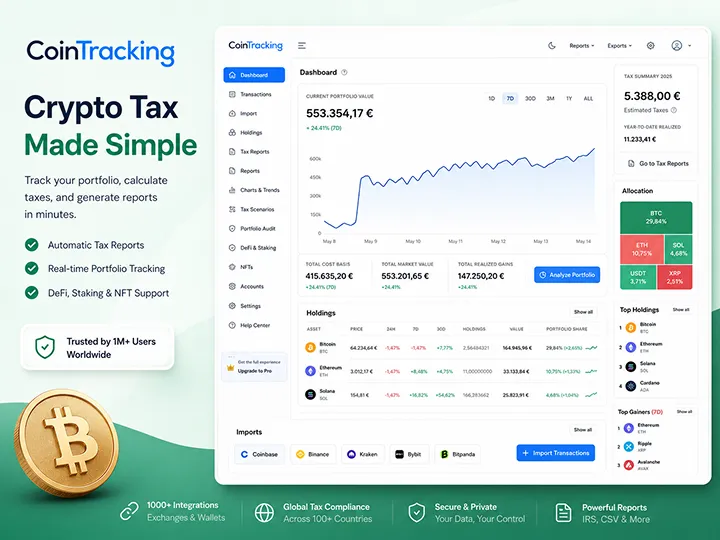

Review scope
This page evaluates CoinTracking as a portfolio-tracking and tax-record system: imports, dashboard, trade analysis, and report preparation. It does not claim filing accuracy, provide tax advice, or treat software output as a substitute for verification.
How we evaluated
What we did: we created an account and worked through CoinTracking the way a new user does. Signup required no name or address, which matters to this site audience. We attempted an exchange connection over API, a Coinbase account, walked the CSV and manual-entry paths, imported wallet history including a Ledger hardware wallet, and reviewed how the dashboard organized the result: portfolio composition as a pie chart, trades per month, balance by day and by exchange, a 30-day Bitcoin price strip, and a toggle between fiat and BTC values. We also switched the display currency from euros to dollars. We then followed the tax-report flow up to the point of purchase: selecting the tax year, choosing a calculation method with tooltips along the way, and reviewing the short/long position views and the tax-free-coins display.
What we did not do: complete a tax filing through CoinTracking, test every exchange, wallet, or blockchain on its supported list, run an independent technical security audit, or purchase every plan tier.
Three honest observations from that walkthrough, so you can calibrate expectations. First, the exchange API connection was the roughest part: Coinbase required manual API-key entry rather than a simple login link, and after connecting once we could not easily repeat the process. Second, wallet imports, including the Ledger, went noticeably better; if your Bitcoin lives in self-custody, the path that matters most to you was one of the smoothest we tested. Third, imports were not always fast: on a larger history, expect to wait rather than watch data appear instantly, a pattern user reports echo.
Product details on this page were last checked in July 2026. Pricing, supported integrations, and checkout terms change, so verify them on CoinTracking's official site before you buy. If a claim here stops matching the product, tell us through the Contact & Corrections page and we will fix it.
Bottom line
CoinTracking gives you more data, more import routes, and more control than the lighter tools in this lane, and charges for it in learning curve, setup time, and plan gating. The depth is real; so is the overhead.
Strongest as one place for portfolio tracking, transaction history, trade analysis, and tax-report preparation: a system you live in year-round, not a form you visit once.
The free plan and trial are useful for testing, but a practical API-driven workflow usually moves into paid territory quickly.
The tradeoff is constant: every layer of depth adds configuration, and every import route still ends in you verifying what came through.
CoinTracking makes the most sense when spreadsheets are getting fragile and you want deeper reporting than a basic balance tracker.
CSV, manual entry, exchange API, automatic API, wallet import, legacy import, and custom exchange import give seven routes to a complete record set.
A user who wants the fastest possible report will find the tabs, statistics, and number of reports more than the job requires.
Referral discount
If the fit above matches your record set, CoinTracking states that referred users receive a 10% discount on account upgrades through referral code B925867. Use the referral route before you create or upgrade the account so the discount can apply, and only if the depth is what you actually need.
B925867 The discount is applied through our CoinTracking referral link. Verify current checkout terms before purchase.
Affiliate disclosure
Official CoinTracking site affiliate link. We may earn a commission at no extra cost to you.
Product snapshot
CoinTracking sits between portfolio tracker and tax-reporting tool. It is built for the user who wants a complete record system, not only a report download at the end of the year.
Practical role
CoinTracking is most useful when the user wants portfolio context, import flexibility, tax reporting, and enough control to inspect the record set before exporting reports.
Primary role
Portfolio plus tax records Record organization, portfolio views, trade analysis, and tax-report preparation in one system, running since 2012.Workflow style
Detailed and configurable More control than minimalist tools, and a workflow you are expected to learn, with tooltips helping along the way.Privacy posture
Anonymous signup, crypto payment No name or address required at signup in our walkthrough; CoinTracking accepts payment in Bitcoin and other cryptocurrencies.Review boundary
Not tax advice This page evaluates workflow, fit, and limitations. It does not decide tax treatment.Workflow
The product is strongest as the central record layer for a messy crypto history, and the record review still ends with you.
In our walkthrough, signup asked for no name or address. For an audience that treats personal data as attack surface, that is a real differentiator in this lane, not a footnote.
CoinTracking offers CSV upload, manual entry, exchange API, automatic API, wallet import, legacy import, and custom exchange import. Breadth does not mean every path is equally smooth, so expect to test per source.
After import, the dashboard showed portfolio composition as a pie chart, trades per month, balance by day and by exchange, and a 30-day Bitcoin price strip, with values switchable between fiat and BTC.
CoinTracking is useful through the year, not just in filing season: realized and unrealized gains, fees, best and worst trades, and volume views help explain how the record set changed before the reporting step.
Select the tax year, choose the calculation method, review the short and long position views and the tax-free-coins display, and export for your tax tool or accountant. The final step is review, not blind export.

Import paths
CoinTracking import menu is the widest we have seen in this lane: CSV upload, manual entry, exchange API, automatic API sync, wallet import, legacy import for old sources, and custom exchange import for platforms without a direct integration. That flexibility matters when records are spread across exchanges, wallets, old files, and closed accounts.
The tradeoff is that import quality varies by path, and our walkthrough made the split concrete. The Coinbase API connection was the rough spot: manual API-key entry instead of a simple login link, and a connection that worked once but was not easy to repeat. Wallet imports, including a Ledger hardware wallet, went well.
Neither experience is universal. Together they set the right expectation: test your specific sources in the free plan before you rely on them, and keep CSV and manual entry in reserve for whatever the automatic path misses.
Fit check
The buying question is not whether CoinTracking is powerful. It is whether your record set and review style justify that level of control.
Good fit
Weak fit
For the Bitcoin-only holder
A buy-hold-withdraw Bitcoin history does not generate the thing CoinTracking is built to analyze: heavy trading activity. Trade-analysis reports, realized-versus-unrealized breakdowns across dozens of assets, and configurable report batteries can sit unused for a holder whose year is a handful of buys, a withdrawal to cold storage, and maybe one consolidation. Test the free plan against your real records before deciding.
In our walkthrough, the Ledger import was one of the smoothest paths in the product, directly relevant if your Bitcoin lives in self-custody.
No name or address at signup, and payment accepted in Bitcoin. If minimizing data exposure matters, this is a real differentiator.
Balance by exchange and by day gives one place to check whether balances, transfers, and fees still reconcile against your own records.
The report flow surfaces a tax-free-coins view. Treat it as a product signal to review, not as a conclusion, and verify local rules before relying on it.
Legacy and custom imports help when part of your history lives in an old export, a closed account, or a source without a direct integration.
Strengths
CoinTracking is strongest when portfolio visibility, import flexibility, and tax reporting are part of the same job.
Seven distinct routes make the tool adaptable to mixed and historical record sources, with wallet import a particular bright spot in our walkthrough.
Balance by exchange, balance by day, trades per month, and the fiat/BTC toggle turn the portfolio view into a reconciliation tool.
Anonymous signup and Bitcoin payment are unique among the three tools we reviewed, a coherent fit for holders who treat data minimization as part of security.
Tax-year selection, multiple calculation methods with tooltips, short/long position views, tax-free-coins display, and exports for tax tools or an accountant.
Weaknesses and friction
None of these is disqualifying. Together they define the honest expectation: a deep record system that pays off with invested time, not a passive tax machine.
Our Coinbase connection required manual API-key entry, worked once, and was not easy to repeat. Budget time for connection setup and keep CSV fallback ready.
On a larger history, data did not appear instantly in our walkthrough, and user reports describe the same. This is wait-and-verify, not a live feed.
The interface is dense. Users who want a three-click tax form may find it cluttered; the depth is the product, and it costs onboarding time.
The materials we reviewed tied priority support to higher plans. Documentation and tickets are useful, but cheap plans should not expect hand-holding near a deadline.
The free plan is useful for portfolio tracking and trial use, but serious tax reports and ongoing imports are tied to paid plans.
Sources in our materials disagreed on older figures. The current official pricing page is the source to check before purchase.
Review before confidence
A detailed report is only useful if the record set behind it is complete and classified sensibly.
Limits
The boundary is the same across the tax-software lane: the tool organizes and calculates from supplied records. It cannot know facts you leave out, and it does not decide treatment questions.
What CoinTracking can do well
What CoinTracking cannot do for you
Portfolio tracking
In our walkthrough, the dashboard organized the portfolio as a pie chart with trades per month, balance by day, balance by exchange, and a 30-day Bitcoin price strip, with every value switchable between fiat and BTC, and the display currency itself configurable.
CoinTracking public materials describe support for over ten thousand cryptocurrencies; the exchange-coverage figures in our materials ranged from 90+ to 300+, so treat any single integration number as marketing shorthand and test your own platforms.
For a Bitcoin-only holder, the value is simpler than the feature list: one place to see whether records and balances still make sense before tax reports are prepared. For active traders, the trade-analysis layer explains how the record set changed before reporting begins.
How CoinTracking compares
We reviewed CoinTracking alongside Koinly and CoinLedger, and all three run the same core loop: import, review, report, with none of them removing the review step. What differs is where each puts its weight.
CoinTracking sits at the record-system end: the most import routes, the deepest portfolio and trade analytics, the only anonymous signup and crypto payment of the three, and the steepest learning curve. Koinly centers on data centralization, with a free preview generous enough that our entire Koinly first pass, roughly a thousand transactions, ran without paying. CoinLedger is the most direct path from import to a US tax report, with the smallest learning curve of the three and a genuinely useful pre-payment preview.
This page does not rank them. The deciding factor is your record set and how much control you actually want: a holder who needs a once-a-year report should test the lighter tools first; a user outgrowing spreadsheets should test CoinTracking against real data before paying for any of them. Use the tax software evaluation criteria before choosing.

Pricing
The current official pricing structure shows a Free plan with a 7-day unlimited-import trial, Starter at $49/year for 200 transactions, Pro at $169/year for 3,500 transactions, Expert tiers starting at $259/year, and Unlimited at $899/year. The pricing page also shows one-year, two-year, and lifetime billing options.
This updates the older review materials, which quoted inconsistent monthly and annual figures. Treat the live pricing page as the source of truth and check it at checkout, especially if your transaction count puts you near a tier boundary.
Two cost-of-ownership details matter beyond the headline price. First, tax reports and ongoing imports are tied to paid plans. Second, priority support and advanced tools appear in higher tiers, so support responsiveness can become part of the real price.
Official references checked
For this update, the plain official reference links are CoinTracking's official site, the CoinTracking pricing page, and the IRS page on digital assets. These are not affiliate routes and carry no tracking parameters.
The product links help verify current plan structure and terms. The IRS link is included as a high-level public reference for US readers, not as filing guidance from this review.

Support and security posture
On security, the practical rule stands regardless of vendor: crypto tax software should never need your seed phrase, private keys, or withdrawal permissions. Its job is transaction visibility, not custody. In our walkthrough the account worked without personal identity data, and exchange API access can be created read-only on supported exchanges.
CoinTracking public materials mention encryption, privacy controls, backups, and multi-device access, but without the technical detail needed for a deep security assessment, and we did not run an independent audit. Treat permissions and data handling as part of your own review.
On support, the self-serve layer is genuinely useful: documentation, tutorials, FAQ, a solution center, and a ticket system. The live layer is weaker in the materials we reviewed: chat felt robotic and not always available, and priority support is tied to higher plans.
Final read
CoinTracking is best for the user who has enough transaction history to need a real record system, and enough patience to learn that system before relying on its reports.
For a simple holder with a few clean purchases, the interface and reporting depth are more tool than the job requires. The free plan and trial will tell you quickly.
For a user with several exchanges, several wallets, historical files, and a need to understand portfolio performance through the year, CoinTracking can be the strongest fit in this lane: the most ways to import, inspect, analyze, and report from one system. For the privacy-minded Bitcoin holder specifically, anonymous signup, Bitcoin payment, and smooth hardware-wallet import form a combination the other tools do not offer.
The practical verdict is balanced: robust and genuinely deep, but not a passive tax answer. Import everything, reconcile balance-by-exchange against the platforms themselves, verify current pricing, budget the learning curve honestly, and then decide whether the depth is what your records actually need.
FAQ
The useful answer is conditional: CoinTracking can be powerful when you need deeper records, but the output still depends on the data you import and review.
Read tax disclaimerIt can be, but the deciding question is whether your history needs the depth. Trade analytics sit mostly unused for a buy-hold-withdraw history, while the hardware-wallet import, anonymous signup, Bitcoin payment, and year-round balance view are genuinely useful. Test your exchange import, wallet import, and transfer matching in the free plan before paying.
Final discount reminder
Test the free plan against your real records, budget the learning curve honestly, then use referral code B925867 for 10% off the upgrade if the record system earns it.
B925867 Apply this code at checkout if prompted.
Affiliate disclosure
Official CoinTracking site affiliate link. We may earn a commission at no extra cost to you.
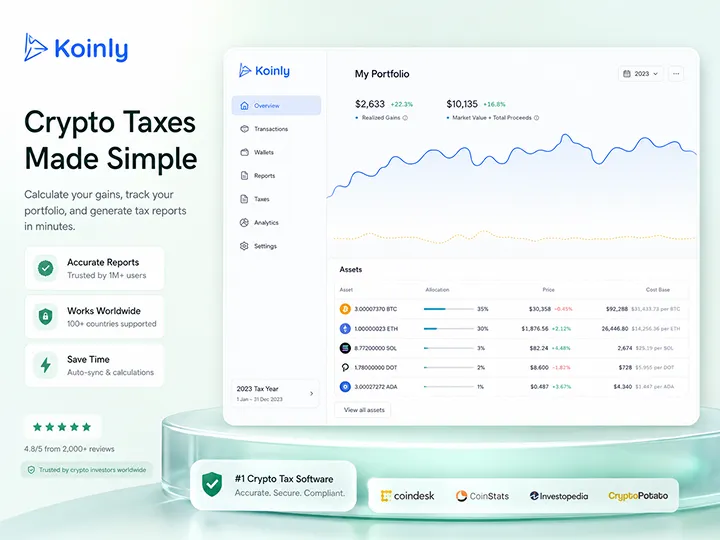
Data centralization with a generous free preview and a transfer-label review step Bitcoin holders should not skip.
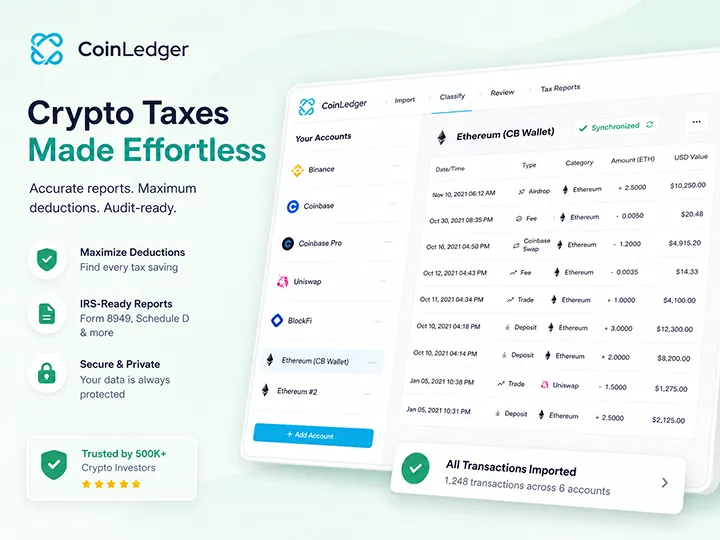
A direct import-and-report-prep workflow with a useful free preview and a visible warning queue.

Start with the broader Bitcoin tax software framework before choosing a product workflow.
Understand why record completeness matters before any tax software output can be useful.

See why exchange files and wallet history often show different slices of the same record story.

Use a calm reviewability framework before comparing tax tools or trusting a generated report.