
Free PDF Checklist

Set Up Your First Bitcoin Hardware Wallet Without Skipping the Step That Proves You Are Safe

Most first setup failures are preventable: the wrong app, a rushed recovery phrase, a device that was trusted too early, or a backup that was never tested. This checklist gives you the order to follow before real funds are at risk.

The rule behind the checklist

Nothing irreversible until your backup is proven.

A lost or broken device can be recovered from a valid recovery phrase. A lost, leaked, mistyped, or untested recovery phrase can turn self-custody into a false sense of safety.

The checklist is built to slow down the exact moments where beginners are most likely to trust too early, confirm too quickly, or treat an untested backup as protection.

What the PDF does

A safer first setup is mostly about sequence.

The checklist does not replace your manufacturer's instructions. It surrounds them with the custody checks that make the official flow safer to follow.

  • Keep the order straight

    Move from buying discipline to arrival checks, setup, backup, recovery proof, small funding, and long-term maintenance without skipping around.

  • Slow down the dangerous moments

    The checklist highlights the moments where beginners are most likely to trust the wrong app, write the wrong word, or confirm too quickly.

  • Protect the recovery phrase

    It keeps the recovery phrase offline, private, checked twice, stored away from the device, and treated as the real recovery layer.

  • Know when you are actually done

    The setup is not finished when the device powers on. It is finished when the backup is proven, a test receive works, and nothing still feels uncertain.

The setup story

From unopened box to safe to fund.

The checklist follows the path in the order a first-time holder actually experiences it. Each stage has a different job, and each stage has a different way to go wrong.

  1. Buy without adding supply-chain risk

    Start from the manufacturer or an authorized reseller, not a marketplace deal or a second-hand device. A first wallet should not begin with trust uncertainty.

  2. Inspect the device before setup

    Check packaging, tamper signs, authenticity checks where available, and the most important red flag: no recovery phrase should arrive pre-written.

  3. Use the official setup path

    Install the companion app only from the official website, let the device generate the phrase, and confirm prompts on the device screen before acting.

  4. Write the recovery phrase offline

    Write every word by hand, in order, and keep it off cameras, cloud notes, password managers, messages, emails, and any internet-connected device.

  5. Run the recovery test

    Before serious funding, restore from the written phrase alone and confirm the same wallet comes back. This is the step that turns a backup into evidence.

  6. Fund only after the setup is proven

    Receive a small test amount first, verify the address on the device, and do not increase exposure while any part of the setup still feels uncertain.

  7. Maintain the setup over time

    Update through the official app, never type the recovery phrase into a site or app, and check periodically that the backup is still legible and reachable.

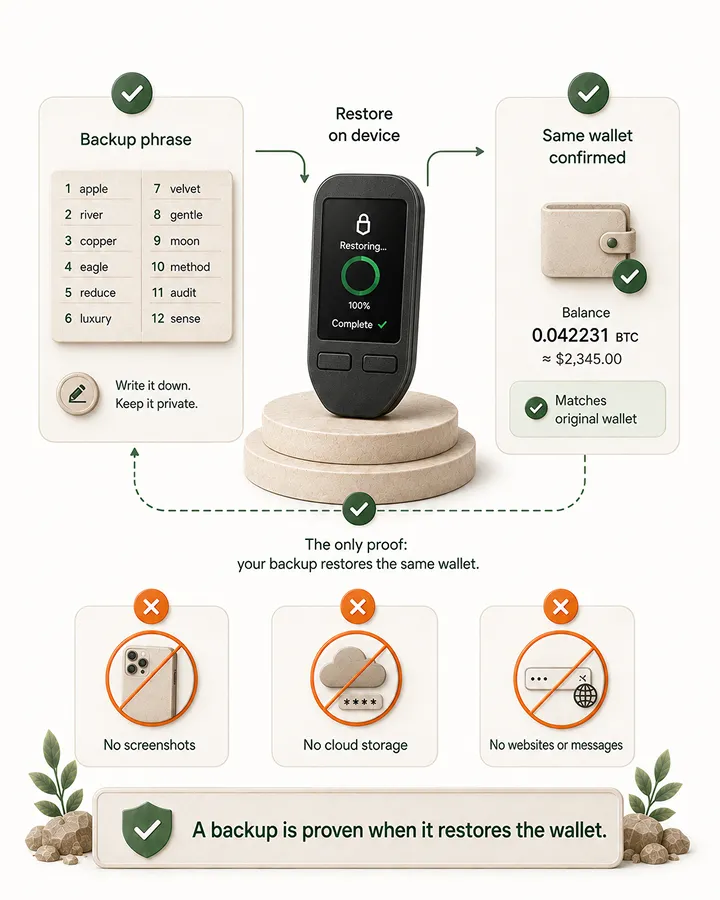
Illustration showing a backup phrase, restore-on-device step, and same-wallet confirmation, with warnings not to store or type the recovery phrase digitally.

The step most people skip

A backup is not proven until it restores the wallet.

Writing down the recovery phrase is necessary, but it is not the same as proving it works. A single wrong word, missing word, or wrong order can stay invisible until the day you need the backup.

That is why the checklist puts a full recovery test before serious funding. The point is not to make setup more complicated. The point is to discover backup mistakes while the stakes are still small.

  • No serious funding before the recovery phrase has restored the same wallet.
  • No screenshots, cloud notes, password-manager entries, or messages containing the recovery phrase.
  • No typing the phrase into any website or app except a genuine device during a real recovery.

Stop immediately if

The checklist also names the setup moments that should halt the process.

A good setup flow is not only a list of things to do. It also tells you when to stop, verify directly, and avoid making the mistake permanent.

Device red flags

  • A recovery phrase arrives already written, printed, filled in, or hidden behind a scratch panel.
  • Packaging looks opened, resealed, or meaningfully different from the manufacturer's own photos.
  • The device asks you to restore or import a wallet you did not create.

App and download red flags

  • You reached the wallet app through a search ad, direct message, or link you did not verify.
  • A website or app asks for your recovery phrase to validate, sync, migrate, or claim anything.
  • Someone asks you to install remote-access software during wallet setup or support.

Recovery phrase red flags

  • Anyone asks for the words, including support, a manufacturer impersonator, or a verification page.
  • You photographed, typed, uploaded, emailed, or messaged the phrase at any point.
  • One word is unclear, misordered, missing, or not tested through an actual restore.

Get the checklist

Open it before your first setup session.

Enter your email and use the PDF beside you while you prepare, inspect, set up, back up, test, and only then increase exposure.

Enter your email to receive the free First Bitcoin Hardware Wallet Setup Checklist PDF.

Read our Privacy Policy. For subscriber questions or corrections, use the Contact & Corrections page.