
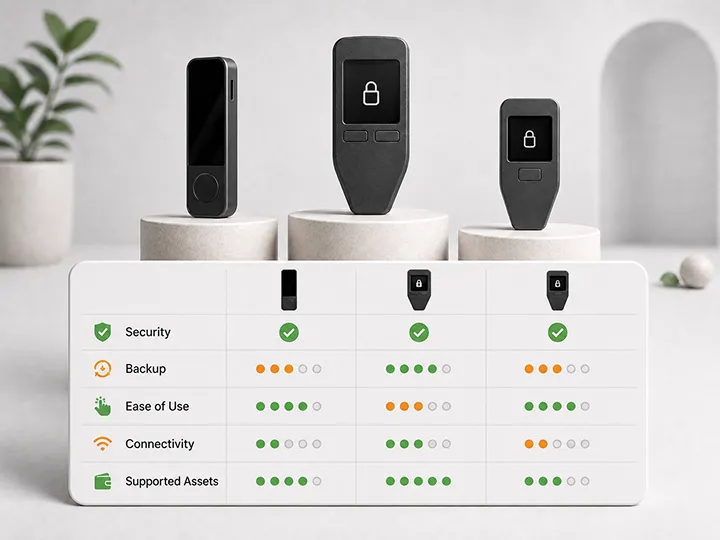

The Coldcard seed-generation incident does not create one universal replacement winner.
It creates a more useful question:
Which security model, signing workflow, recovery process, and user experience can you understand and operate correctly after generating a completely new seed?
This guide compares seven hardware wallets already reviewed by Bitcoin Plaster: Trezor Safe 3 Bitcoin-Only, Trezor Safe 5 Bitcoin-Only, Trezor Safe 7, BitBox02 Bitcoin-only, Blockstream Jade, Jade Core, and Jade Plus.
Each device solves the custody problem differently. Some prioritize a focused Bitcoin-only workflow. Some prioritize touchscreen guidance. Some emphasize open hardware, QR signing, or multiple connection paths. Those differences matter more than finding one new slogan to replace the old slogan.
Last verified: August 3, 2026
Incident status: Coinkite's investigation remains ongoing. This page compares alternative devices based on current evidence and existing Bitcoin Plaster reviews. It does not claim that any vendor is immune from future defects.
Critical migration warning: restoring the old Coldcard recovery words on any device below recreates the same private keys. A replacement device helps only when it generates a completely new seed and the Bitcoin is transferred to addresses derived from that new seed.
Affiliate disclosure: This article contains official-store affiliate links. Bitcoin Plaster may earn a commission at no extra cost to you. Blockstream links apply the current partner discount automatically at checkout. Affiliate relationships do not change the buyer-fit limits, exclusions, or security boundaries below.
The Quick Answer
| Best fit | Device | Main reason to choose it | Main reason to skip it |
|---|---|---|---|
| Focused Bitcoin-only desktop or Android workflow | BitBox02 Bitcoin-only | Narrow Bitcoin-only experience, secure-chip architecture, open-source firmware, and a clear backup workflow | Not iPhone-first, not QR-based, and the touch controls require learning |
| Lower-cost Bitcoin-only Trezor | Trezor Safe 3 Bitcoin-Only | Focused firmware, familiar Trezor Suite path, and lower entry cost | Smaller display and physical-button workflow |
| Guided touchscreen Trezor | Trezor Safe 5 Bitcoin-Only | Comfortable touchscreen verification and guided Bitcoin-only setup | Higher cost than Safe 3 and no QR air-gapped signing |
| Premium mobile-oriented Trezor | Trezor Safe 7 | Large-screen premium workflow for users who prioritize phone-based use | Too expensive and complex for buyers who only need a simple first signer |
| Flexible value route | Blockstream Jade | USB-C, Bluetooth, and QR options in the lowest-cost Jade model | Small screen, less polished controls, and camera or Bluetooth friction |
| Large-screen connected signer | Blockstream Jade Core | Large display and connected workflow without paying for a camera or battery | Not designed for QR signing or untethered use |
| Premium QR signing | Blockstream Jade Plus | Best Jade camera, screen, controls, and repeatable QR workflow | Unnecessary if USB-C simplicity matters more than QR isolation |
Bitcoin Plaster's default recommendation for most focused desktop or Android-compatible Bitcoin holders is BitBox02 Bitcoin-only. That is a buyer-fit verdict, not a claim of permanent immunity. Readers who want a guided touchscreen may fit Trezor Safe 5 better. Readers who specifically want QR signing may fit Jade Plus better. Budget and workflow can make Safe 3 or the original Jade more rational choices.
You May Not Need a Different Device
Coinkite states that fixed Coldcard firmware can generate a replacement seed correctly. Affected users are not technically required to abandon the brand or buy another hardware wallet.
A different device may still be useful because it can:
- keep the old wallet available while the new setup is tested;
- reduce dependence on the same vendor and implementation;
- simplify migration by avoiding repeated seed switching on one device;
- provide a workflow that better matches the user's actual needs;
- create an opportunity to redesign backup and recovery correctly.
Buy a replacement because its trust model and workflow fit you, not because the incident turned every competing product into a universal safe haven.
What the Coldcard Incident Changes About Wallet Selection
The incident exposed a dangerous shortcut in hardware-wallet thinking: treating one visible feature as proof that the complete system is secure.
Air-Gapped Does Not Prove Good Seed Generation
An air gap changes how transaction data moves between the signer and another device. It does not prove that the seed was generated with sufficient randomness.
QR signing can be valuable. It can reduce direct cable or radio communication during signing. It still depends on the device firmware, entropy process, transaction parser, backup, and user verification.
A Secure Element Does Not Prove Every Other Component
A secure element can protect secrets against selected physical attacks. It cannot compensate for weak seed generation, a misleading interface, unsafe backup handling, or incorrect transaction verification.
Open Source Does Not Mean Error-Free
Open source allows inspection, independent builds, and public discussion. It does not guarantee that every important code path has already been reviewed or that a production configuration matches every reader's assumptions.
Reproducible Builds Answer One Specific Question
Reproducibility can help show that a distributed binary matches published source code. It does not independently prove the quality of physical randomness, the absence of hardware faults, or the safety of every dependency.
The Complete Workflow Is the Product
A hardware wallet must support a chain of actions:
- generate or protect a seed;
- record and verify the backup;
- show receiving addresses on a trusted screen;
- display transaction details before signing;
- survive firmware maintenance;
- recover correctly after loss or failure;
- support migration without panic.
The best alternative is the device whose complete chain you can understand, test, and repeat.
Best Overall Focused Pick: BitBox02 Bitcoin-Only
Best for: Bitcoin-only holders using desktop or Android-compatible devices who want a narrow setup path, secure-chip architecture, open-source firmware, and a disciplined backup process.
Why it fits after the Coldcard incident: BitBox02 combines more than one source of randomness in its seed-generation design, and BitBox has publicly stated that BitBox02 and BitBox02 Nova are not affected by this specific Coldcard RNG vulnerability. The Bitcoin-only edition also reduces product scope and keeps the companion application focused.
The practical strength is not only the architecture. Bitcoin Plaster's hands-on review covered pairing, firmware, wallet creation, written and microSD backup, receiving, sending, and recovery boundaries. That complete workflow is why BitBox02 is the default recommendation here.
Security-model boundary: the secure chip and open-source firmware do not make the device immune from every implementation, supply-chain, companion-app, backup, or user error. The microSD backup and written recovery words also create two recovery objects that must be protected deliberately.
Skip it if: you are iPhone-first, require camera-based signing, want a large screen, or prefer conventional buttons or a touchscreen.
Check BitBox02 at the official store Read the full BitBox02 review
Best Lower-Cost Trezor: Trezor Safe 3 Bitcoin-Only
Best for: buyers who want a lower-cost Bitcoin-only Trezor, a familiar Trezor Suite workflow, physical buttons, and a focused first hardware-wallet setup.
Why it fits after the Coldcard incident: Safe 3 is a practical route for users who want to move away from a highly manual Coldcard workflow without paying for a touchscreen or premium mobile features. The Bitcoin-only firmware narrows the software surface, while the device screen supports address and transaction verification.
Security-model boundary: Bitcoin-only firmware and a secure element address particular risks. They do not eliminate the need to verify firmware, generate a new seed, protect the backup, inspect addresses, and test recovery.
Skip it if: a small screen or button-based interaction will make you rush confirmations, or if you specifically want QR signing or touchscreen guidance.
Check Trezor Safe 3 at the official store Read the full Safe 3 review
Best Guided Touchscreen Trezor: Trezor Safe 5 Bitcoin-Only
Best for: Bitcoin holders who want Trezor Suite, Bitcoin-only firmware, a larger touchscreen, and a more comfortable guided setup and verification process.
Why it fits after the Coldcard incident: Safe 5 is easier to operate than a keypad-driven or small-screen device for users who benefit from clearer on-device interaction. That can matter during migration, when seed creation, word confirmation, receiving-address checks, and transaction approval must be performed without ambiguity.
Security-model boundary: interface comfort can reduce operational mistakes, but it does not replace backup verification or make the device independent of firmware and companion software. It is also a connected signer rather than a QR-first air-gapped device.
Skip it if: you want the lowest-cost Trezor, prefer physical buttons, or specifically require a camera-based transaction workflow.
Check Trezor Safe 5 at the official store Read the full Safe 5 review
Best Premium Mobile-Oriented Trezor: Trezor Safe 7
Best for: users who prioritize a premium large-screen experience, phone-oriented use, and the highest-end Trezor workflow in this review set.
Why it fits after the Coldcard incident: Safe 7 is relevant when the migration is also an opportunity to improve daily usability. A device that is easier to verify and maintain may be safer in practice for a user who regularly signs from a phone and would otherwise avoid checking details on a smaller device.
Security-model boundary: premium hardware and mobile convenience introduce more features and dependencies. More capability is not automatically a stronger custody model. The buyer still needs a written recovery plan and a verified fallback path.
Skip it if: you want the simplest Bitcoin-only setup, the lowest cost, or a device whose main purpose is isolated QR signing.
Check Trezor Safe 7 at the official store Read the full Safe 7 review
Best Flexible Value Route: Blockstream Jade
Best for: patient Bitcoin holders who want USB-C, Bluetooth, and QR signing options in one lower-cost device and are comfortable learning the tradeoffs.
Why it fits after the Coldcard incident: Blockstream states that the Jade lineup is unaffected by this specific Coldcard vulnerability. Jade also places more of its hardware and firmware design in public view and supports multiple signing paths, allowing the owner to choose between convenience and stronger communication isolation.
Bitcoin Plaster's hands-on review found USB-C the simplest workflow, QR the most isolated tested workflow, and Bluetooth reconnection the roughest. The device delivers unusual flexibility for its price, but the user must accept a small screen, budget controls, and a camera that requires patience.
Security-model boundary: Jade uses Blockstream's Blind Oracle virtual secure-element architecture rather than a traditional sealed secure-element chip. That is a different trust model, not a universal upgrade. QR signing also does not repair weak seeds or eliminate transaction-verification risk.
Skip it if: you expect premium polish, flawless mobile reconnection, a large display, or a traditional sealed-secure-element design.
Check Blockstream Jade at the official store Read the full Jade review
Best Large-Screen Connected Jade: Jade Core
Best for: users who want a larger Jade display and connected signing workflow but do not need a camera, battery, or repeated QR sessions.
Why it fits after the Coldcard incident: Jade Core separates the desire for a larger, clearer screen from the desire for air-gapped signing. That makes it useful for readers who care more about reviewing transaction details comfortably than about maintaining a camera-based workflow.
Security-model boundary: Jade Core shares the Jade family's Blind Oracle security architecture. Its larger screen improves visibility, but its connected design means it is not the right answer for someone whose primary requirement is QR isolation.
Skip it if: you need a portable battery-powered device, a camera, or stateless SeedQR workflows.
Check Jade Core at the official store Read the full Jade Core review
Best Premium QR Route: Jade Plus
Best for: users who specifically want camera-based transaction signing, a better display, improved controls, battery power, and the strongest repeated QR experience in the Jade family.
Why it fits after the Coldcard incident: Jade Plus gives users a practical way to separate transaction signing from direct USB or Bluetooth communication. Its improved camera and screen make QR workflows more repeatable than on the original Jade, which matters when isolation is a real operating requirement rather than a marketing preference.
Security-model boundary: Jade Plus uses the same Blind Oracle model as the other Jade devices. Its premium hardware improves usability and communication isolation; it does not prove flawless seed generation or eliminate the need for a tested backup.
Skip it if: USB-C is already acceptable, QR signing would rarely be used, or the additional price buys features that will remain idle.
Check Jade Plus at the official store Read the full Jade Plus review
Choose by Security Model
| Security-model preference | Best starting point | What still requires trust |
|---|---|---|
| Secure chip plus focused Bitcoin-only workflow | BitBox02 Bitcoin-only | Firmware, companion app, seed-generation implementation, backup handling, and user verification |
| Trezor ecosystem with Bitcoin-only options | Safe 3 or Safe 5 | Firmware, Suite workflow, device hardware, recovery process, and connected computer or phone |
| Premium mobile-oriented Trezor workflow | Safe 7 | Expanded feature set, mobile environment, firmware, backup, and recovery discipline |
| Open Jade architecture and multiple communication paths | Jade | Blind Oracle model, firmware, companion software, camera or connection workflow, and recovery material |
| Large-screen connected Jade | Jade Core | Connected host, firmware, Blind Oracle model, and recovery plan |
| QR-first Jade workflow | Jade Plus | QR parser, firmware, camera workflow, Blind Oracle model, backup, and user verification |
Choose by User Type
I Want the Simplest Focused Bitcoin Setup
Start with BitBox02 Bitcoin-only, Trezor Safe 3 Bitcoin-Only, or Trezor Safe 5 Bitcoin-Only. The choice is mainly between BitBox's narrow desktop or Android workflow, Safe 3's lower-cost physical-button route, and Safe 5's touchscreen guidance.
I Want QR Signing
Choose between the original Jade and Jade Plus. Jade is the value route. Jade Plus is the stronger long-term choice when the camera, screen, and repeated QR experience justify the higher cost.
I Want a Large Screen but Not QR
Jade Core is the clearest fit inside the Jade family. Trezor Safe 5 and Safe 7 are stronger alternatives when touchscreen guidance and the Trezor software path matter more than the Jade architecture.
I Am Primarily Using an iPhone
Do not buy BitBox02 Bitcoin-only without first confirming that its workflow matches your devices. Trezor Safe 7 is the premium phone-oriented route in this review set. Jade models may also fit mobile users through supported companion workflows, but each connection path has its own friction.
I Want the Lowest Reasonable Cost
Compare Trezor Safe 3 Bitcoin-Only and Blockstream Jade. Safe 3 gives a focused Trezor experience. Jade gives more connection and signing options but demands more patience and understanding.
I Want to Reduce Dependence on One Vendor
A different vendor can reduce concentration in one implementation, but a single new device still creates one key-generation and recovery path. For larger balances, independent signers from different vendors may reduce shared failure risk when used in a correctly designed multisignature setup. That additional complexity must be documented, backed up, and tested before it can be called safer.
Do Not Build a More Complex Wallet During a Panic
The Coldcard incident can make multisignature, passphrases, dice rolls, stateless signing, and air-gapped workflows feel mandatory.
They are not mandatory for every holder.
Each can add protection under the right conditions:
- a strong passphrase can add an independent secret;
- dice can add independent entropy when performed correctly;
- QR signing can reduce direct communication paths;
- multisignature can reduce dependence on one key-generation environment;
- multi-vendor signing can reduce one vendor's ability to satisfy a threshold.
Each can also create new failure modes:
- lost passphrases;
- incorrect dice procedures;
- unverified QR data;
- missing descriptors;
- incomplete multisig backups;
- inaccessible signers;
- recovery plans nobody has tested.
During migration, use the simplest setup you can verify completely. Complexity should be introduced only after the immediate funds are protected and the recovery plan is understood.
The Correct Purchase Sequence
- Confirm whether the old seed should be treated as affected.
- Choose the security model and workflow you can operate correctly.
- Buy through the manufacturer's official store or another currently authorized source.
- Inspect the package and confirm that the device is uninitialized.
- Install or verify current official firmware.
- Create a completely new seed privately.
- Record and verify the recovery backup.
- Confirm the receiving address on the device screen.
- Send a small test transaction.
- Verify recovery and spendability before moving the remaining balance.
Read the full migration procedure before funding the replacement:
How to Move Bitcoin From a Potentially Weak Coldcard Seed Without Making It Worse
Frequently Asked Questions
Which Coldcard Alternative Is Best Overall?
BitBox02 Bitcoin-only is the default recommendation for most focused desktop or Android-compatible Bitcoin holders in this review set. Safe 5 may be better for touchscreen guidance, and Jade Plus may be better for QR-first users.
Is Trezor Safer Than Coldcard?
No universal statement like that is supportable. The products use different hardware, firmware, entropy, connection, and recovery architectures. This page compares current buyer fit and documented trust boundaries, not permanent immunity.
Is Jade Safer Because It Is Air-Gapped?
Jade and Jade Plus support QR transaction signing, which can isolate the signing exchange from direct cable or radio communication. That does not prove seed quality or eliminate firmware, parser, backup, or user-verification risks.
Does BitBox02 Fix My Old Coldcard Seed?
No. BitBox explicitly warns that importing an affected Coldcard seed into a BitBox does not repair the seed. Generate a new seed on the replacement device and move the Bitcoin on-chain.
Can I Continue Using Coldcard?
Yes. Coinkite states that fixed firmware can generate a new seed correctly. This alternatives guide is for readers who prefer a different workflow, want a second device during migration, or want to reduce dependence on the same vendor.
Should I Buy Two Different Wallet Brands for Multisig?
Multi-vendor multisig can reduce one shared failure mode, but it adds descriptor, backup, coordination, inheritance, and recovery complexity. Do not build it during a panic unless you already understand and can test the complete process.
Should I Restore the Old Seed to Check Whether the New Device Works?
No. Create a new seed on the replacement device. Restoring the old seed reproduces the old keys and preserves the original risk.
Final Recommendation
Do not replace one absolute belief with another.
Coldcard was not made unsafe by the absence of fashionable security labels. It failed at a foundational implementation boundary: seed-generation entropy. Competing devices can use strong architectures and still depend on code, hardware, build systems, companion applications, backups, and users.
The most defensible choices in this reviewed set are:
- BitBox02 Bitcoin-only for the strongest default focused Bitcoin-only workflow;
- Trezor Safe 3 Bitcoin-Only for lower-cost Trezor entry;
- Trezor Safe 5 Bitcoin-Only for guided touchscreen use;
- Trezor Safe 7 for a premium mobile-oriented Trezor setup;
- Blockstream Jade for flexible value;
- Jade Core for a large-screen connected signer;
- Jade Plus for the best Jade QR workflow.
The right device is the one whose seed generation, backup, address verification, transaction signing, firmware maintenance, and recovery process you can explain and test.
Related Reading
- Coldcard Seed Vulnerability: What Happened and Why It Matters
- Was My Coldcard Seed Affected? A Step-by-Step Check
- How to Move Bitcoin From a Potentially Weak Coldcard Seed Without Making It Worse
- Best Bitcoin Hardware Wallets: Current Winners and Buyer Fit
- Hardware Wallet Security Models
- What a Hardware Wallet Does Not Solve
Update Log
August 3, 2026
- Compared all seven current Bitcoin Plaster hardware-wallet affiliate products.
- Added buyer-fit, exclusion, security-model, connection, and recovery boundaries.
- Verified the Coldcard migration boundary against Coinkite's current advisory.
- Included BitBox and Blockstream statements concerning this specific Coldcard vulnerability.
- Added direct official-store routes with campaign-specific attribution.
Primary Sources
- Coinkite, Coldcard Security Advisory, published July 30, 2026 and updated August 1, 2026.
- Coinkite, Technical Deep Dive into the Entropy Issue, published July 30, 2026 and updated August 1, 2026.
- BitBox, BitBox Is Not Affected by the Coldcard RNG Vulnerability, published July 31, 2026.
- Blockstream, Jade Is Unaffected by the Recent Coldcard Vulnerability, published July 31, 2026.